Unified Cinematic Prompt for Presentation Visuals

AI-generated visuals can make a presentation feel more expressive, premium, and memorable. They can also make a deck feel inconsistent in minutes. One slide looks like a luxury film still, the next looks like a tech illustration, and the next feels like a stock photo from a different brand. Each image may be attractive on its own, but the presentation does not feel like one coherent story.
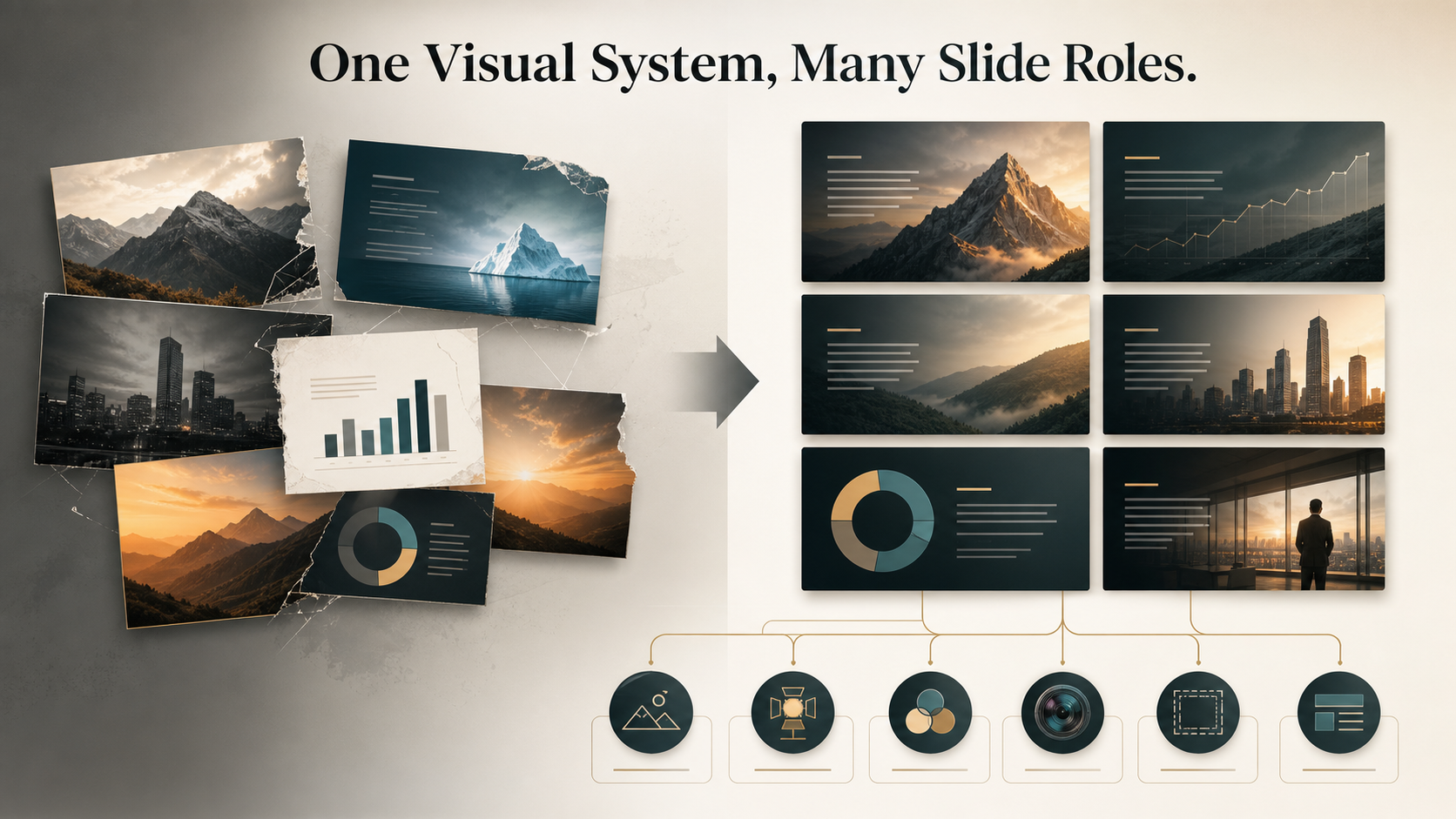
That is where a unified cinematic prompt becomes useful. Instead of writing a separate prompt for every slide, you define a deck-level visual system first. The prompt becomes a creative direction document for mood, lighting, composition, realism, subject treatment, and consistency. For business presentations, this matters because visuals are not decoration. They shape how the audience understands the message, trusts the presenter, and remembers the argument.
A unified cinematic prompt is not just a cinematic prompt with more adjectives. It is a reusable visual framework that helps presentation visuals support narrative flow across a pitch deck, executive presentation, consulting report, sales deck, product launch deck, or brand proposal.
Why Cinematic Prompts Matter in Presentation Visuals
Cinematic language is powerful because it describes how a scene should feel, not only what it should contain. A basic AI visual prompt might say, “a business team reviewing data.” A cinematic prompt might define the scene as calm, focused, high-trust, softly lit, shot with a shallow depth of field, framed with negative space for a slide headline, and placed in a premium enterprise environment.
That difference is important in presentation visuals. Slides need hierarchy, pace, and emotional control. A strong cinematic prompt can guide whether a visual feels urgent, optimistic, analytical, strategic, disruptive, or reassuring. It can also define whether the viewer should focus on a person, a product, a market shift, a system, or a key tension in the story.
The best cinematic prompt for presentation visuals is not the most dramatic one. It is the one that makes the business message easier to understand. Lighting should support readability. Composition should leave room for text. Backgrounds should add context without competing with the slide. The result should feel intentional, not theatrical for its own sake.
The Problem with One-Off Visual Prompts
One-off prompting is tempting because it feels fast. You write a prompt for each slide, generate a visual, choose the best result, and move on. The problem appears when the slides are viewed together. The images may differ in color temperature, realism level, camera angle, background density, and emotional tone.
This creates several presentation problems:
- Visuals feel disconnected even when the content is logically connected.
- Slide-to-slide pacing becomes unstable, with some pages feeling cinematic and others feeling generic.
- The audience notices style changes instead of following the argument.
- Revisions become difficult because there is no shared visual rule set.
- Images may look impressive but fail to support the business message.
In a professional deck, consistency is not about making every slide identical. It is about making every slide feel like part of the same world. A unified cinematic prompt gives the AI a recurring creative language so individual scenes can vary while the overall presentation remains coherent.
What a Unified Cinematic Prompt Should Control
A strong unified cinematic prompt should define the visual system before describing individual scenes. The system should include mood, lighting, palette, composition, lens language, subject treatment, realism, background density, and consistency rules.
Mood sets the emotional direction. For example, an investor pitch may need confidence and momentum, while an executive risk review may need control and seriousness. Lighting determines whether the deck feels bright and optimistic, dark and intense, or balanced and analytical. Palette keeps slides visually related, especially when different subjects appear across the deck.
Composition is especially important for presentations. Unlike standalone artwork, slide visuals must work with headlines, charts, speaker notes, and supporting copy. A unified cinematic prompt should specify negative space, focal points, text-safe areas, and whether the visual should be wide, centered, asymmetrical, close-up, or environmental.
Lens language can also help. Terms like “wide-angle establishing shot,” “medium close-up,” “shallow depth of field,” or “documentary realism” guide the AI toward a consistent visual grammar. Subject treatment defines how people, products, data environments, or abstract concepts should appear. Realism rules prevent some slides from becoming overly stylized while others look photographic.
Finally, the prompt should include negative constraints. These are the boundaries that protect business readability: no cluttered backgrounds, no exaggerated expressions, no random logos, no unreadable interface text, no overly dark scenes, and no visual elements that distract from the message.
A Reusable Unified Cinematic Prompt Template
Use this structure as a practical starting point. Adapt it for your company, audience, and deck type rather than copying it word for word.
```text Create presentation visuals for a [business context] deck designed for [audience]. The overall tone should feel [strategic / premium / analytical / optimistic / urgent / calm]. Use a unified cinematic style: [realistic / semi-realistic / editorial / documentary / premium tech], with consistent [lighting style], [color palette], and [composition approach].
Visual mood: [describe emotional atmosphere]. Lighting: [soft natural light / controlled studio light / cinematic side light / bright executive environment]. Palette: [primary colors, accent colors, contrast level]. Composition: leave clear negative space for slide headlines and business copy; maintain strong focal hierarchy. Lens language: [wide establishing shots / medium close-ups / shallow depth of field / clean architectural framing]. Subject treatment: people and objects should feel credible, modern, and relevant to [industry or theme]. Background density: detailed enough to provide context, but not cluttered. Consistency rules: keep the same visual world, lighting logic, realism level, and color temperature across all slides. Slide function: adapt the scene for [title slide / problem slide / data slide / product slide / closing slide]. Negative constraints: avoid random logos, distorted hands, unreadable text, excessive darkness, decorative clutter, cartoonish exaggeration, and visuals unrelated to the business message. ```
The most important part is the relationship between the deck-level system and the slide-specific function. The system creates continuity. The slide function creates variation.
How to Adapt One Cinematic System Across Different Slide Types
A unified cinematic prompt should not force every slide to use the same composition. A title slide may need a wide, atmospheric image with strong negative space. A section divider may use a more abstract visual that signals a shift in the story. A problem slide may benefit from tension, contrast, or isolation. A product slide may need brighter lighting and clearer subject focus.
For data slides, cinematic visuals should usually become quieter. They can appear as subtle backgrounds, framing devices, or contextual imagery, but they should not compete with charts or KPIs. The visual system still matters, but readability becomes the priority. A product slide can use the same lighting and palette while moving to a closer composition. A closing slide can return to a wider, more confident image that gives the presentation a sense of resolution.
The goal is controlled variation. Each slide should serve its role in the narrative while remaining part of the same visual world.
Where Pi Fits in a Cinematic Presentation Workflow
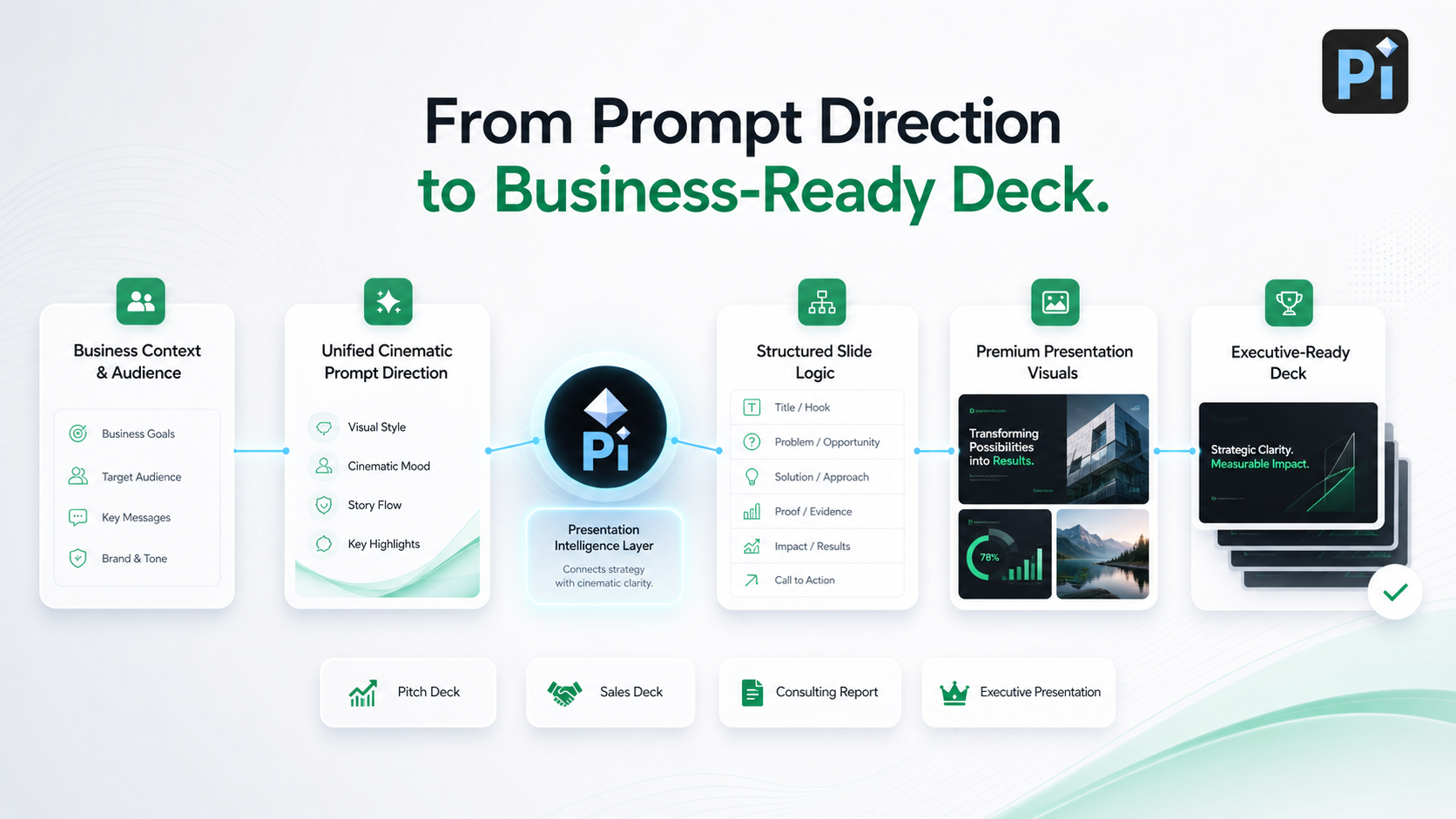
Pi, short for Presentation Intelligence, is an AI presentation maker built for professional business presentations. In a cinematic workflow, Pi is not simply about generating attractive visuals. Its value is helping teams connect visual direction with business structure, slide logic, and premium presentation aesthetics.
1. Business Logic Comes Before Slide Styling
A cinematic prompt works best when the deck already has a clear argument. Pi supports that deeper workflow by helping shape the presentation around audience, purpose, business context, and narrative sequence. This matters because even beautiful visuals cannot rescue a deck with weak logic.
2. Visual Direction Supports the Full Deck
Professional teams often need more than a single impressive cover image. They need a visual system that can support pitch decks, consulting reports, sales decks, executive presentations, and brand proposals. Pi helps teams apply a consistent creative direction across multiple slide types while keeping the business message central.
3. Premium Quality Needs Revision Control
Cinematic presentation visuals often require refinement. A team may need to reduce visual drama, improve clarity, adjust tone, or make a slide feel more executive-ready. Pi’s workflow is suited to this kind of professional iteration, where structure, aesthetics, and business fit are improved together rather than treated as separate tasks.
Comparison Table: Basic Prompting vs Unified Cinematic Prompting
| Presentation Need | Basic Visual Prompting | Unified Cinematic Prompting |
| Consistency | Varies slide by slide | Maintains a shared visual system |
| Storytelling | Scene-focused | Deck-level narrative support |
| Visual hierarchy | Often accidental | Planned around slide readability |
| Business fit | Depends on each prompt | Guided by audience and purpose |
| Revision control | Hard to standardize | Easier to refine with clear rules |
When Cinematic Visuals Can Hurt a Presentation
Cinematic visuals become a problem when style overtakes clarity. A dark, dramatic image may look impressive but make text hard to read. A complex background may feel premium but weaken the chart. A highly stylized metaphor may be memorable but unrelated to the business point.
The safest approach is to treat cinematic direction as a support system, not the main event. In a professional deck, the audience should remember the argument, not just the atmosphere. Avoid visuals that are too theatrical, too cluttered, or too literal. Be especially careful with AI-generated details such as fake interface screens, random brand marks, unrealistic people, and distorted objects.
If a visual does not help the audience understand the slide faster, trust the message more, or feel the intended tone, it should be simplified or replaced.
A Better Way to Build Visually Consistent Business Decks
A unified cinematic prompt is most effective when it is part of a presentation strategy. It should define the deck’s visual world, but it should also respect the slide structure, audience expectations, and business objective. The strongest presentation visuals are consistent without becoming repetitive, cinematic without becoming distracting, and premium without weakening readability.
For teams building high-stakes business decks, Pi offers a practical workflow for connecting prompt direction with professional presentation structure. It helps turn cinematic intent into a deck that feels coherent, business-ready, and visually polished. The result is not just a better-looking presentation. It is a presentation where every visual has a role in the story.
Frequently Asked Questions (FAQ)
Q: What is a unified cinematic prompt? A: A unified cinematic prompt is a reusable visual direction system for an entire presentation deck. It defines mood, lighting, palette, composition, realism, subject treatment, and consistency rules so AI-generated visuals feel connected from slide to slide.
Q: How is a cinematic prompt different from a normal AI visual prompt? A: A normal AI visual prompt usually describes one image. A cinematic prompt describes both the subject and the visual language, including atmosphere, camera style, lighting, and emotional tone. For presentations, it should also include readability and layout constraints.
Q: Can one cinematic prompt work for every slide in a deck? A: One deck-level prompt can guide every slide, but each slide should still include a specific function. A title slide, data slide, product slide, and closing slide need different compositions even if they share the same visual system.
Q: Should business presentations always use cinematic visuals? A: No. Cinematic visuals are useful when they support the message, tone, and audience. They can hurt a presentation if they reduce readability, add clutter, or distract from the business logic. The best approach is to use cinematic prompting with clear structure and restraint.