Why Presentation Editing Takes Longer Than You Think

A first draft feels like progress because the deck finally exists. There are slides, headlines, charts, and a visible structure. For many teams, that moment creates the impression that the presentation is almost finished.
Then the real work begins.
Presentation editing takes longer than expected because editing is not just fixing typos or aligning boxes. It is the stage where rough material becomes clear, credible, audience-ready, and decision-ready. The first draft creates content. Editing turns that content into communication that can survive executive scrutiny, client questions, investor pressure, or internal debate.
That is why teams often feel frustrated after the first draft. They are not simply “cleaning up slides.” They are refining logic, resolving stakeholder feedback, checking evidence, improving visual hierarchy, and making sure every slide supports the purpose of the meeting.
The First Draft Is Not the Finish Line
A generated or manually assembled deck is usually a starting point, not a finished presentation. It may contain useful material, but it still needs to answer a harder question: will this help the audience understand, trust, and act on the message?
Slide creation and presentation readiness are different stages. Slide creation produces a deck. Presentation readiness means the deck has a coherent argument, accurate evidence, appropriate tone, consistent design, and a clear path toward a decision.
The gap between those stages is where editing time grows. A deck may look complete but still have weak headlines, unclear logic, repetitive sections, inconsistent chart treatment, or conclusions that do not follow naturally from the evidence.
For business presentations, editing usually includes:
- Making the storyline easier to follow
- Rewriting slide titles as clear takeaways
- Checking whether evidence supports the recommendation
- Aligning the deck with audience priorities
- Improving layout, visual, and language consistency
- Incorporating feedback without breaking the structure
This is why a deck can be visually complete but not strategically ready.
Where Presentation Editing Time Actually Goes
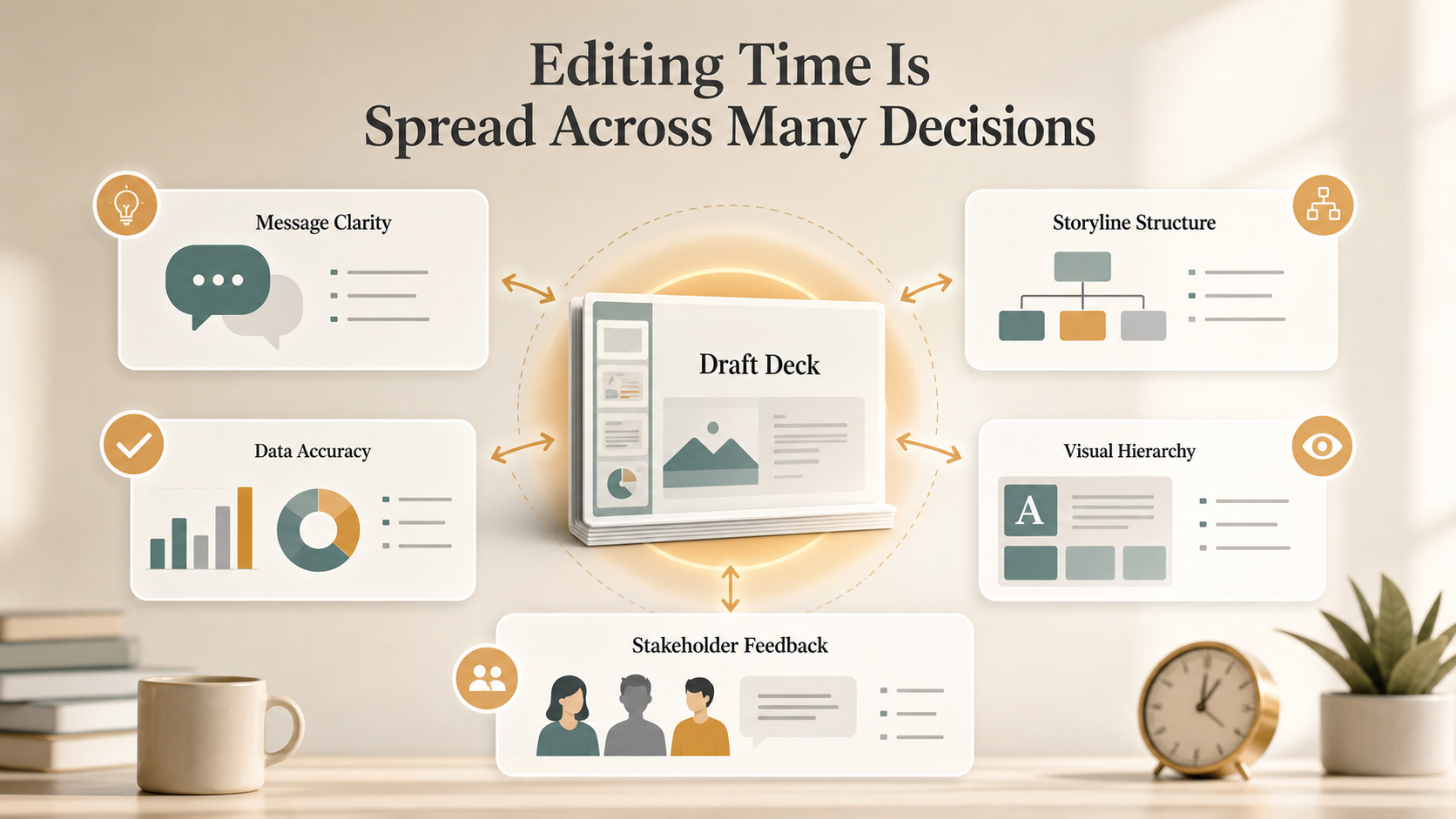
Most teams underestimate presentation editing because the work is spread across many small decisions. Each decision looks manageable. Together, they create a long revision cycle.
A major part of editing goes into message clarity. Teams often discover that the first draft explains the topic but does not make a strong point. The audience may need a sharper recommendation, a clearer problem statement, or a stronger link between analysis and action.
Slide headlines also take time. Weak headlines describe content: “Market Overview” or “Q3 Performance.” Stronger headlines communicate the takeaway: “Enterprise demand is shifting toward faster implementation cycles.” Rewriting headlines can change the rhythm of the entire presentation.
Structure is another source of revision work. A deck may contain the right slides in the wrong order. Moving one section can require rewriting transitions, changing executive summary points, and adjusting the final recommendation.
Design consistency matters too, but not as decoration. Inconsistent layouts make the audience work harder. If each slide uses a different hierarchy, chart style, or visual pattern, the reader must relearn the deck repeatedly.
Then there is data accuracy. Numbers need to match source material, chart labels need to be clear, and claims need to be supported. In high-stakes decks, one questionable figure can weaken confidence in the whole presentation.
Finally, stakeholder feedback adds complexity. Comments from executives, sales leaders, consultants, product teams, or finance reviewers may be useful but conflicting. Editing becomes the process of reconciling those inputs into one coherent deck.
Why Revisions Expand Instead of Shrink
Presentation revisions often expand because slides are interconnected. A small comment on one slide can create work across the entire deck.
For example, if a stakeholder says, “The recommendation needs to focus more on cost reduction,” that is not a one-slide edit. The team may need to revise the executive summary, reorder supporting evidence, adjust chart emphasis, remove unrelated points, and rewrite the closing slide.
The same happens when the storyline changes. A new narrative direction can require updated section dividers, revised headlines, new visuals, different data cuts, and a more focused appendix. What looked like a quick edit becomes a structural rebuild.
This is the hidden complexity of presentation workflow. Slides are not independent pages. They are parts of an argument. When the argument changes, the deck changes with it.
The Productivity Cost of a Weak Presentation Workflow
Poor revision workflows create more than late nights. They reduce presentation productivity across the team.
When ownership is unclear, multiple people edit the same slides in different directions. When feedback is collected informally, teams spend time interpreting vague comments. When the structure is weak, every review round reopens the same strategic questions.
This leads to slower approvals, longer meetings, and repeated feedback cycles. Instead of discussing the decision, stakeholders discuss the deck. Instead of refining the recommendation, teams debate what the presentation is trying to say.
A weak workflow also creates version-control problems. One person updates the data, another changes the wording, and a third adjusts the design. Without a clear editing model, the deck can become less coherent with every revision.
A Better Way to Think About Presentation Editing
The best way to reduce editing chaos is to stop treating editing as random slide cleanup. A stronger model moves from strategic questions to visual polish in the right order.
First, edit for logic. Does the deck make a clear argument? Does each section support the main message? Does the recommendation follow from the evidence?
Second, edit for audience relevance. The same content may need different framing for executives, clients, investors, or internal teams. A leadership audience may need implications and decisions. A technical audience may need assumptions and detail.
Third, edit for visual hierarchy. Each slide should make it obvious what to read first, what supports the point, and what the audience should remember.
Only after those layers are stable should the team focus on final polish: spacing, alignment, typography, icon consistency, and small formatting issues. This sequence helps teams avoid polishing slides that later need to be rewritten or removed.
How Pi Supports a More Revision-Ready Workflow
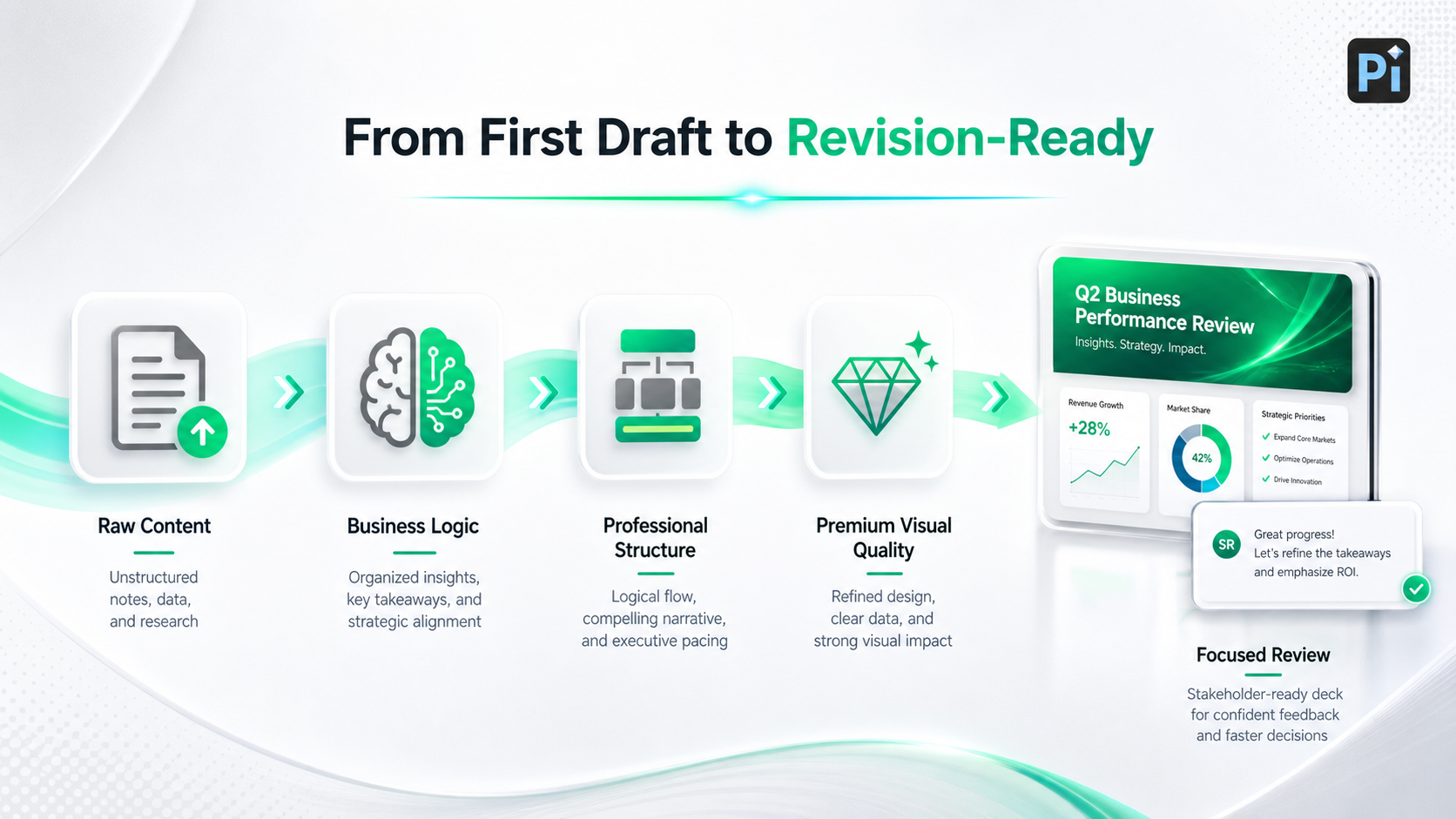
Pi, short for Presentation Intelligence, is an AI presentation maker built for professional business presentations. Its value is not that it removes human judgment. Strong presentations still need expert review, stakeholder nuance, and strategic approval. Pi helps by improving the quality of the deck earlier, so teams begin revision with stronger structure, clearer logic, and more consistent visual execution.
1. Business Logic Comes Before Slide Styling
Pi supports decks where the argument matters as much as the appearance. For pitch decks, sales decks, consulting reports, executive presentations, market research decks, and product launch decks, the core challenge is not simply making slides look polished. The deck must explain why the message matters, why the audience should believe it, and what action should follow.
By helping shape a more logical flow earlier, Pi can reduce the structural rework that appears late in the editing process. This is especially useful when teams are preparing for high-stakes meetings where the deck must connect market context, evidence, recommendation, and next steps.
2. Professional Structure Reduces Revision Friction
Many editing cycles happen because the first draft lacks a strong presentation structure. Sections may be uneven, supporting points may feel disconnected, or recommendations may appear before the audience has enough context.
Pi is designed to support business-ready structure, helping teams move from raw content toward a more coherent deck. That gives reviewers something more focused to evaluate, which can make feedback more specific and useful.
Instead of asking, “What is this deck trying to say?” stakeholders can respond to the actual business argument. Clearer review inputs often lead to fewer revision rounds.
3. Premium Visual Quality Supports Clearer Review
Visual quality affects review quality. If slides look inconsistent, stakeholders may focus on surface issues before discussing the message. Pi helps create more polished, business-grade aesthetics earlier in the workflow, which can reduce avoidable formatting distractions during review.
The goal is not to make design the only priority. It is to make the deck clear enough that reviewers can focus on strategy, evidence, and decisions. When visual hierarchy is stronger from the start, teams can spend less time fixing formatting problems and more time improving business content.
Presentation Workflow Comparison
| Workflow Stage | Traditional Post-Draft Editing Workflow | Pi-Supported Workflow |
| First draft quality | Often uneven in structure and visual consistency | More structured and business-ready from the start |
| Message refinement | Rewritten manually across many slides | Supported by clearer narrative logic earlier |
| Stakeholder review | Feedback may reopen core structure | Review can focus more on decisions and nuance |
| Visual consistency | Often fixed late in the process | Built into the workflow earlier |
| Final preparation | Formatting, rewriting, and alignment overlap | Polish happens after stronger logic is in place |
The Practical Verdict: Editing Is Strategic Work
Presentation editing takes longer than expected because it is where the deck becomes useful. The process is not merely cosmetic. It is where teams sharpen the message, validate evidence, align stakeholders, improve structure, and prepare the presentation for a real business outcome.
A strong presentation workflow recognizes that editing is strategic work. It should happen in layers: logic first, audience relevance second, visual hierarchy third, and polish last. When teams skip that order, revision cycles expand and productivity suffers.
Pi can help teams reduce avoidable friction by creating more revision-ready decks before stakeholder review begins. It does not eliminate the need for human thinking, but it can help professional teams start from a stronger foundation: clearer business logic, better structure, and premium visual quality for high-stakes presentations.
Frequently Asked Questions (FAQ)
Q: Why does presentation editing take so long after the first draft?
A: Presentation editing takes time because the first draft usually reveals deeper issues in logic, audience fit, evidence, structure, and design consistency. Teams are turning rough content into a decision-ready communication asset.
Q: How can teams improve presentation productivity during revisions?
A: Teams can improve presentation productivity by editing in the right order: logic first, audience relevance second, visual hierarchy third, and final polish last. Clear ownership and focused feedback also help reduce revision cycles.
Q: Can an AI presentation maker reduce editing time?
A: An AI presentation maker can help by creating a stronger starting point, improving structure, and supporting more consistent slide design. Human review remains essential for strategic judgment, stakeholder alignment, and final approval.
Q: How does Pi support a better presentation workflow?
A: Pi supports a better presentation workflow by helping teams build business-ready structure, clearer narrative logic, and premium visual quality earlier in the process. This can make revisions more focused and reduce avoidable structural and formatting work.