How Many Slides Do Great Presentations Really Need? A Data-Driven Analysis

“How many slides should my presentation have?” sounds like a formatting question, but it is really a communication question. The right slide count depends on what your audience needs to understand, how much time you have, and what decision or action the deck must support.
A strong deck is not automatically short, visual, or built around one slide per minute. Great presentations use the right number of slides to make an argument clear, paced, and easy to follow. That is why presentation length, slide density, and narrative structure should be planned together.
The Short Answer: There Is No Perfect Slide Count

There is no universal ideal number of slides. A five-minute project update may need three slides. A 20-minute strategy presentation may need 12. A detailed market research deck may need 40 or more, especially if it is designed to be read after the meeting.
The better question is not “How many slides is normal?” It is “How much thinking does the audience need to do per slide?” Ten overloaded slides can feel slower than 20 clean, well-paced slides. Slide count matters only in relation to clarity, pacing, and audience understanding.
A useful starting point is to define three boundaries: the time available for delivery, the complexity of the message, and the level of detail the audience expects. Once those are clear, slide count becomes a planning result rather than a guess.
Why Average Presentation Slides Can Be Misleading
Searches for average presentation slides often come from people looking for a benchmark. Benchmarks help, but averages hide major differences between presentation types. A startup pitch deck, executive update, sales deck, consulting report, workshop, and research presentation all use slides differently.
A pitch deck may be short because investors need a focused story. A consulting report may be longer because it must show analysis, options, and evidence. A training session may use many slides because examples and exercises break up the flow. An executive update may use fewer slides because the audience wants implications, not background.
This is why presentation statistics should be interpreted carefully. Averages may describe what people create, but they do not prove what works. Great presentations are built around attention, comprehension, and decision-making, not a generic slide count.
Practical Slide Count Benchmarks
For a five-minute update, three to six slides is often enough: context, key update, evidence, risk, and next step. For a 10-minute briefing, six to 10 slides usually gives enough room to introduce the issue, explain the logic, and close with a recommendation.
For a 20-minute business presentation, 10 to 18 slides is a reasonable range. This allows each major idea to breathe without forcing every detail onto one page. For a 30-minute sales, strategy, or planning deck, 15 to 25 slides may be appropriate, especially if the deck includes data, use cases, objections, or discussion points.
Longer research, training, or consulting sessions are different. They may require 30, 50, or more slides, but those slides do not all carry the same weight. Some may be section dividers, charts, exercises, examples, or appendix-style evidence. In these cases, presentation length is not only about speaking time. It is also about how the deck functions as a reference asset.
The Real Metric: Information Density Per Slide
The most important metric is information density. A slide can look simple but still be conceptually heavy if it contains multiple charts, competing claims, or dense text. Another slide may contain only one idea and be much easier to process.
A common mistake is reducing slide count by compressing too much content onto each page. This may make the deck look shorter, but it often makes the presentation harder to understand. Audiences cannot read a dense slide and listen to the speaker with equal attention.
Sometimes, more slides improve clarity. Splitting one overloaded slide into three focused slides can create a better rhythm: first the question, then the evidence, then the implication. The deck becomes longer, but the communication becomes cleaner.
How Slide Count Affects Clarity and Engagement
Slide count affects engagement through pacing. Too few slides can create long stretches where the audience stares at the same visual while the speaker explains several ideas. Too many slides can feel rushed if each slide disappears before the audience has processed it.
Engagement usually drops when slides repeat the same point, lack a clear headline, or ask the audience to read paragraphs while listening. The issue is not simply the number of slides. It is whether each slide advances the story.
Visual hierarchy also matters. A deck with clear titles, focused charts, and disciplined layouts can sustain attention longer than a shorter deck with cluttered pages. Good slide count planning makes the audience feel guided, not dragged through content.
Slide Count by Presentation Scenario
Executive presentations are usually shorter and more selective. Leaders often want the answer, the business impact, and the recommended decision. A concise executive deck may use five to 12 slides, with supporting analysis placed in the appendix.
Pitch decks often range from 10 to 15 slides because they need to tell a complete but focused story: problem, solution, market, traction, business model, go-to-market, team, and ask.
Sales decks vary more widely. A discovery-oriented sales conversation may use fewer slides, while an enterprise proposal may require use cases, ROI, implementation details, and proof.
Consulting reports and market research decks often need more slides because they must show reasoning. In these decks, slide count supports credibility. Product launch decks may sit in the middle, combining strategy, positioning, timeline, audience, and execution plan. Internal updates should stay lean unless the purpose is documentation rather than discussion.
A Better Way to Plan Presentation Length
The best way to plan presentation length is to count messages before counting slides. Start by defining the decision the presentation supports. If there is no decision, define the audience shift: what should people understand, believe, or do after the meeting?
Then map the narrative. A business presentation usually needs context, tension, evidence, recommendation, and next steps. Assign one key message to each slide. If one slide has two important messages, consider splitting it. If two slides say the same thing, combine or remove one.
After that, estimate pacing. Some slides need 20 seconds. Others need two minutes. A complex chart, financial model, or strategic recommendation deserves more time than a transition slide. Finally, remove anything that does not change the audience’s understanding.
Where Pi Helps: Turning Structure Into the Right Number of Slides
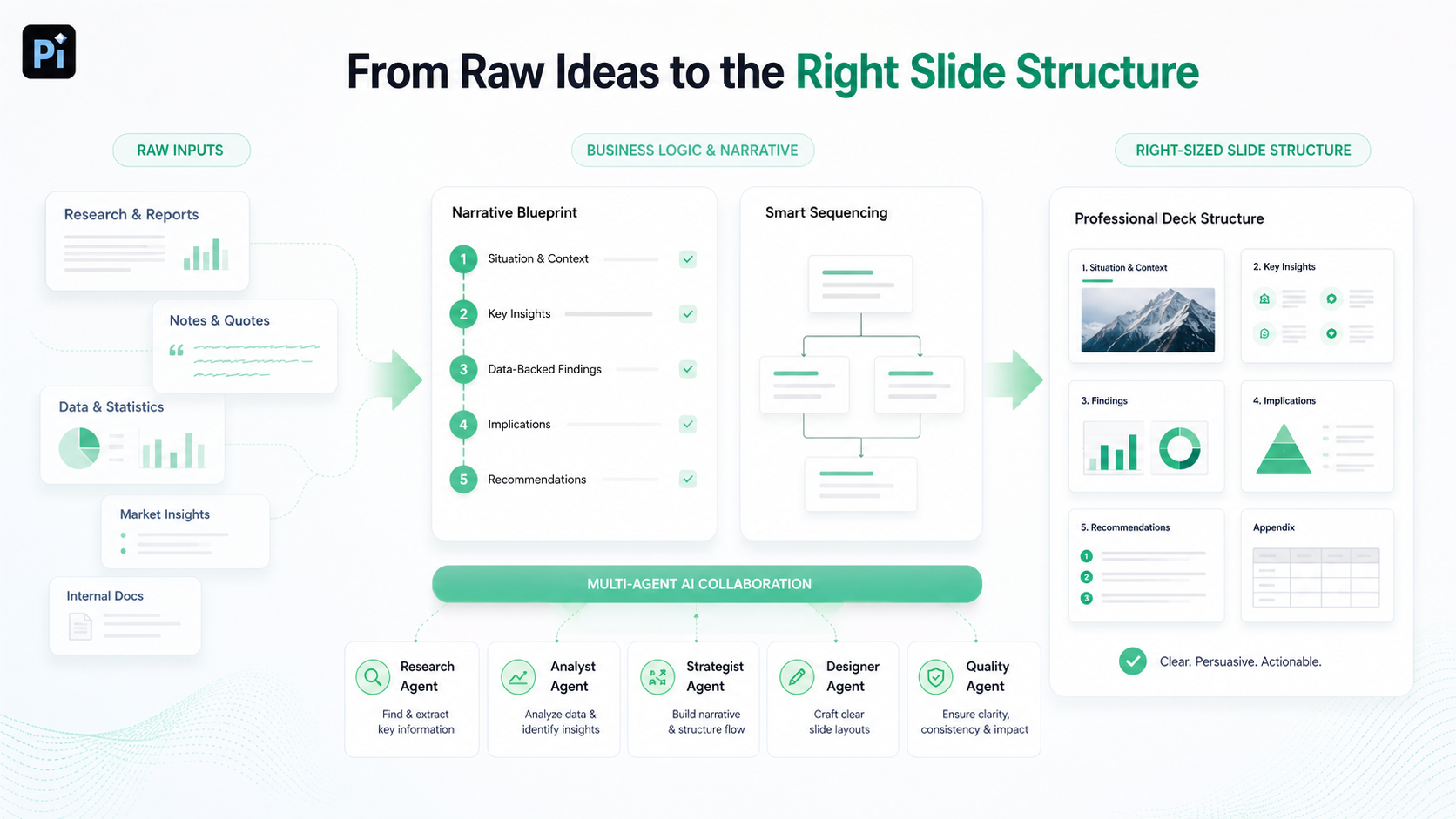
Pi, short for Presentation Intelligence, is an AI presentation maker and AI PPT generator built for professional business presentations. It helps teams turn raw material, research, and business logic into a deck structured for a specific audience and use case.
Pi is useful because slide count is not only a design decision. It is a strategic decision. For pitch decks, sales decks, consulting reports, executive presentations, brand proposals, market research decks, and product launch decks, the first challenge is usually structure: what should be included, what should be removed, and what sequence makes the message easier to accept?
Pi’s Multi-Agent AI approach supports synthesis, narrative planning, slide structure, and visual execution. The right slide count often emerges from sequencing. When the story is organized well, it becomes easier to see whether a deck needs more explanation, tighter editing, or a stronger transition between ideas.
Teams often revise decks because the slide count is wrong for the meeting: too long for an executive update, too thin for a sales proposal, or too dense for a research readout. Pi helps create business-ready structure and premium visual quality so the deck can better match the time limit and communication goal.
That does not mean every deck should be long or short. It means the number of slides should reflect the work the presentation must do.
Presentation Statistics and Slide Count Benchmarks
| Presentation Type | Typical Slide Range | Audience Need | Pacing Requirement |
| Executive update | 5–12 | Decisions and implications | Fast, selective |
| 10-minute briefing | 6–10 | Clear issue and recommendation | Focused, direct |
| Pitch deck | 10–15 | Complete investment story | Tight, persuasive |
| Sales deck | 12–25 | Use cases, proof, ROI | Conversational |
| Consulting report | 20–50+ | Analysis and recommendations | Evidence-led |
| Training or workshop | 30–80+ | Learning and interaction | Modular |
The Verdict: Count Messages Before You Count Slides
Great presentations do not need a perfect slide count. They need the right amount of structure for the audience, message, and time available. A short deck can fail if it is too dense. A longer deck can work if every slide has a clear job and the pacing feels intentional.
The most reliable rule is simple: count the messages first. Then build the minimum number of slides needed to make those messages clear without unnecessary friction. That is the difference between chasing average presentation slides and designing a presentation that actually works.
Frequently Asked Questions (FAQ)
Q: How many slides should a 10-minute presentation have?
A: A 10-minute presentation often works well with six to 10 slides, depending on complexity. Use fewer slides for a simple update and more slides if you need to explain evidence, options, or a recommendation.
Q: Is one slide per minute a good rule?
A: It can be a useful starting point, but it is not universal. Some slides may take 20 seconds, while a detailed chart may require two minutes. Pacing should follow the message.
Q: What counts as too many slides?
A: You probably have too many slides if several repeat the same idea, the audience feels rushed, or the deck includes details that do not support the meeting’s purpose.
Q: How can I reduce slide count without losing clarity?
A: Remove repeated points, move supporting details to an appendix, combine slides with the same message, and rewrite headlines so each page has one clear purpose.

 The Hidden Cost of Poor Presentations: Research on Time, Meetings, and Productivity
 How Many Slides Do Great Presentations Really Need? A Data-Driven Analysis